
Monitor every device in one platform
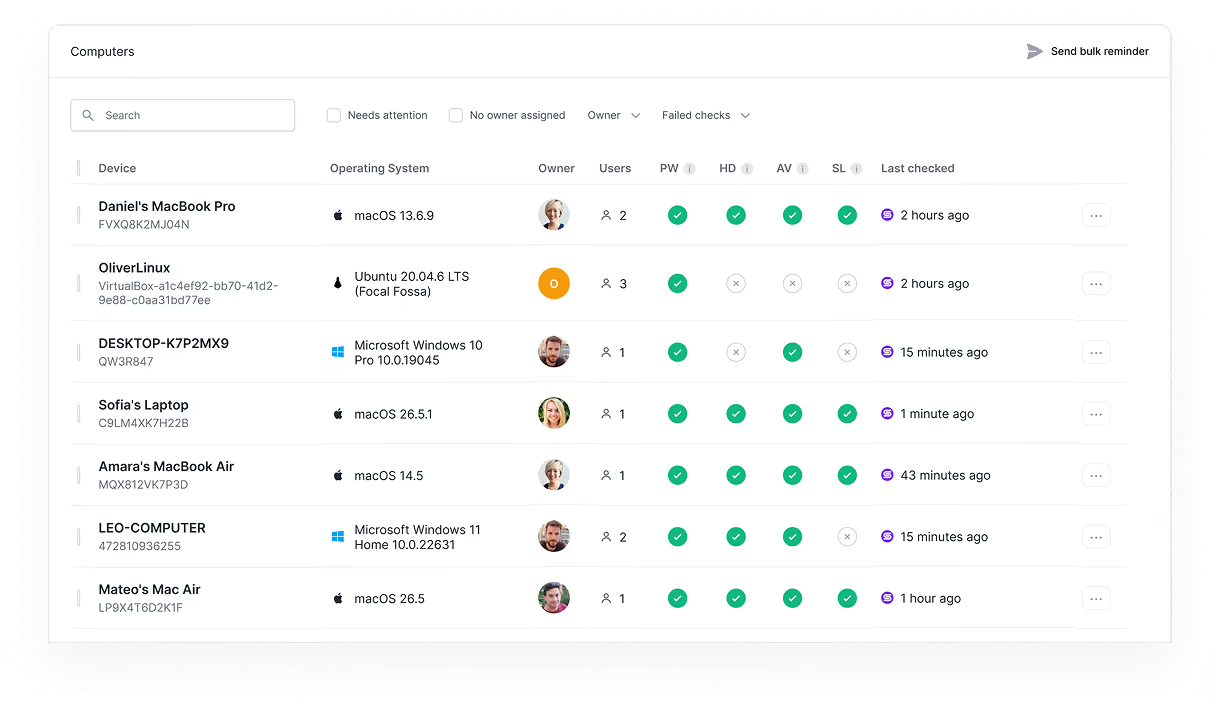
Secfix monitors encryption, screen lock, antivirus, and password manager on every device, and turns it into audit evidence.


%201.svg)
%201.svg)
%201%20(1).svg)
.svg)



Four security checks on every device
Auditors want proof that employee devices are secured. The Secfix Agent runs four checks on every Mac, Windows, and Linux machine: disk encryption, screen lock, antivirus, and password manager.
It runs them continuously, not as a one-off screenshot before the audit. When a device drifts out of compliance, you see it in the platform before your auditor does.


See every installed app and browser extension
The Secfix Agent is read-only and gives you a full software inventory for every Mac, Windows, and Linux device: which applications are installed and which extensions are running in the browser. That makes shadow IT and unapproved tools visible across your fleet, so you can act on risky software before an auditor flags it.

See every failing device, and fix it without chasing people
Secfix brings every device into one view, whether it reports through the Secfix Agent or a connected MDM like Intune, across macOS, Windows, and Linux. Filter to the devices that need attention: a failing check, an out-of-date OS, or an agent that has been switched off.
When a device drops out of compliance, Secfix nudges the owner to fix it and shows exactly which controls are affected, so gaps close before your audit instead of during it.

What our customers say about us

“Secfix enabled us to achieve the ISO 27001 certification swiftly and efficiently, a success we could not have accomplished without them.”


“I’d recommend Secfix in a heartbeat. Secfix made our journey to ISO 27001 certification seamless and fast. "


“The combination of an intuitive platform and knowledgeable team made Secfix the ideal partner for Tanso’s certification journey."


“Secfix is more than just software—it’s a partner who could guide you through the entire process. Secfix offered the perfect combination of the right size, good value for money, and the features we actually needed. "


“I strongly recommend Secfix to any organization that wants to simplify their compliance management and stick to standards. Secfix’s easy-to-use interface, strong documentation management, and helpful reporting features have been key to our successful ISO certification. For any company looking to improve their compliance efforts and see real results, Secfix is a must-have tool.”


“I recommend Secfix to any company starting the journey of ISO 27001 and TISAX compliance with data protection. Their platform and dedicated support made the process much more manageable. In fact, I have already recommended Secfix to several peers in the industry.”

Secfix is rated a leader on G2
Secfix consistently ranks as a G2 industry leader based on hundreds of customer reviews.

FAQs
What is the Secfix Agent?
The Secfix Agent is a lightweight, read-only application that monitors the security of employee devices for compliance. It checks each Mac, Windows, and Linux machine for the controls auditors require and reports the results into the Secfix platform automatically. It runs silently in the background and collects device security configuration only.
What does the Secfix Agent check on each device?
The agent runs four checks on every device: disk encryption, screen lock, antivirus, and password manager. These are the device-level controls that auditors expect to see evidenced. Checks run continuously, so a device that falls out of compliance is flagged in the platform.
Is the Secfix Agent an MDM?
No. The Secfix Agent is a read-only compliance monitor, not a mobile device management solution. It cannot push software, change settings, or wipe a device. For companies without an MDM, it covers device compliance without the cost and complexity of deploying one. For companies that already run an MDM, it works alongside it.
Does the Secfix Agent work on Mac, Windows, and Linux?
Yes. The agent supports macOS, Windows, and Linux, so every employee laptop is covered under one compliance view. The same four checks apply across all three operating systems.
Can I use the Secfix Agent with my existing MDM, like Intune?
Yes. If you already use Intune, Kandji, or another MDM, you can connect it to Secfix instead of, or alongside, the agent. Device compliance status from either source flows into the same view and is used as audit evidence.
Do I need to monitor employee devices for ISO 27001?
Yes. ISO 27001 expects evidence that employee devices are secured, including disk encryption, screen lock, antivirus, and a password manager. Auditors look for proof that these controls are enforced across the team. Continuous monitoring produces that evidence without manual collection.
How are device checks used as audit evidence?
Each device's compliance status is recorded in Secfix and mapped to the relevant controls for ISO 27001, SOC 2, TISAX, ISO 42001, and more. Instead of collecting monthly screenshots from each employee, you get continuously updated, audit-ready evidence in one place. Your auditor sees current device status, not a stale snapshot.